
Everything you wanted to know about planning and were afraid to ask. AAPI to the rescue!
FAQ - Planning
How to manage staff planning with AAPI
Managing staff planning becomes complicated when schedules, employee availability, contracts, absences, shift changes and payroll all have to be managed separately.
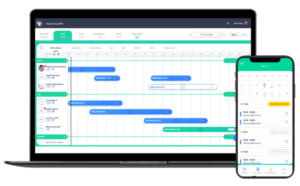
AAPI brings these elements together in one digital planning solution.
With AAPI, businesses in Belgium can create and manage fixed or variable work schedules, plan employees according to availability, respond to unexpected absences and connect their planning with other HR processes such as Dimona, time registration and payroll.
The result: one central place to plan who works, when they work and what happens when the schedule changes.
What is staff planning with AAPI?
AAPI is a digital workforce planning and time tracking solution designed to make daily staff management easier.
Managers can use AAPI to create schedules, manage shifts and monitor their workforce from the web platform or mobile app. Employees can access their schedules through AAPI ME and stay informed when planning changes.
Instead of maintaining separate Excel files, messages and administrative processes, the schedule becomes the starting point for several connected HR processes.
AAPI supports both fixed and variable schedules, making the planning solution suitable for organisations where working hours remain stable as well as businesses where staffing requirements change frequently.
How do you create a staff schedule with AAPI?
AAPI is designed to make employee scheduling as straightforward as possible. The planning environment allows managers to create schedules using an intuitive drag-and-drop approach and select employees according to their availability.
A typical planning process looks like this:
- Start with your staffing requirements. Determine which shifts, working hours, departments or locations need to be covered.
- Create the required shifts or work schedules. For recurring planning, AAPI can use work schedules to plan employees on fixed days or over a longer period.
- Select the appropriate employees. Use employee availability to identify who can work during the required period.
- Create, invite or publish your shifts. Employees can receive their planning digitally, reducing the need for separate messages or spreadsheets.
- Manage changes from the same planning environment. Adapt hours, fill open shifts, replace absent employees or make last-minute changes when required.
- Let the connected processes follow the planning. Depending on the employee and configuration, AAPI connects planning with processes including Dimona, contracts, time registration and payroll.
This creates a single workflow from planning the shift to processing the hours worked.
How do fixed work schedules work in AAPI?
Not every employee needs to be planned manually every week.
For employees who regularly work on the same days, AAPI allows managers to use work schedules. Employees can be scheduled automatically using fixed schedules or planned on specific recurring days over a longer period.
This is particularly useful when part of your workforce follows a predictable working pattern.
Instead of rebuilding the same schedule every week, the existing work schedule becomes the basis for future planning.
How do you plan employees according to availability?
Good staff planning starts with knowing who is available.
AAPI makes employee availability part of the planning process. Employees can use AAPI ME to share their availability and consult relevant planning information.
Managers can then take employee availability into account when building the schedule.
This is especially useful for organisations working with flexible teams, students, flexi-job workers or other employees whose availability can change from week to week.
By keeping availability and planning together, managers have a clearer view of which employees can cover a particular shift.
How do you manage an unexpected absence?
Even the best schedule changes.
An employee can become ill, request leave or unexpectedly become unavailable. AAPI is designed to help managers adapt the schedule without rebuilding everything manually.
When an absence needs to be covered, AAPI can suggest employees with the same function who may be able to replace the absent employee. Managers can then organise the replacement and update the planning.
This means an absence becomes a planning adjustment rather than the start of a chain of phone calls, messages and spreadsheet changes.
How do you make last-minute shift changes?
AAPI combines planning with employee communication so managers can react quickly when operational requirements change.
You can adjust schedules, fill gaps and communicate changes from the planning environment. Through WHATSAAPI, businesses can communicate schedule-related information with employees without relying on multiple external messaging groups.
AAPI can also take availability, wage costs and efficiency into account when helping managers identify possible candidates for a shift.
The mobile AAPI app provides a daily planning overview, allowing managers to make schedule changes from their smartphone when they are away from their computer.
How does Multiselect make planning faster?
A large schedule often requires the same action for multiple employees or shifts.
AAPI’s Multiselect functionality allows managers to handle several planning items at once.
You can use Multiselect to perform actions such as managing multiple planning items, inviting several employees, reusing a calendar for another period, creating longer absences or sending shift-switch requests.
Instead of repeating the same operation employee by employee, several items can be handled together.
For businesses managing larger teams or multiple shifts, this can significantly simplify daily schedule management.
How does AAPI connect planning and Dimona?
Within AAPI, staff planning is connected to Dimona processing.
Dimona declarations can be automatically adjusted according to employee schedules or absences. This means that when relevant planning information changes, the connected administrative process can follow the updated schedule.
AAPI therefore treats planning as more than a visual calendar. The schedule becomes an operational source for connected HR administration.
This connection is particularly valuable in environments with flexible employees, frequent schedule adjustments and day-based employment administration.
How does planning connect with payroll?
Planning does not stop when the shift begins.
AAPI connects schedule management with time registration and payroll processes. Employees can clock in and out using AAPI TIME, while scheduled and registered working hours can feed into the wider payroll workflow.
AAPI also connects with social secretariats.
This creates a continuous process:
planning → working hours → time registration → payroll
Managers no longer need to treat scheduling and payroll as completely separate processes.
How do smart notifications help create a better schedule?
AAPI includes smart notifications to help managers identify issues while working with their planning.
For example, AAPI can provide notifications related to contracts, Dimona processing and mandatory breaks.
The objective is to surface relevant information at the moment the manager is creating or managing the schedule instead of discovering issues afterwards.
This makes the planning environment not just a calendar, but also a tool for monitoring the administrative processes surrounding a shift.
Can employees see their own schedule?
Yes.
Employees can access their schedules through the AAPI ME employee app. The app brings together planning information with other employee-related information such as availability, shift changes, contracts and payslips.
Giving employees direct access to their current schedule reduces the need to distribute updated schedules manually.
When something changes, digital communication and notifications help keep employees informed.
Can I manage planning from my smartphone?
Yes.
AAPI provides an employer app alongside its web platform.
The mobile app provides access to the daily schedule and allows managers to handle important planning actions while they are away from their desk.
This is particularly useful in hospitality, retail, catering, events and other operational environments where managers are not continuously working behind a computer.
Why use AAPI instead of Excel for staff planning?
A spreadsheet can display who is supposed to work, but AAPI connects the schedule with the processes surrounding that employee.
AAPI combines planning with employee availability, absences, shift changes, contracts, Dimona, communication, time registration, payroll and reporting.
That means changing a schedule is no longer an isolated change in a spreadsheet.
The planning becomes part of a connected workforce-management process.
Who is AAPI Planning designed for?
AAPI was created around the needs of organisations where staff planning can be complex and operational requirements change frequently.
Today AAPI provides planning and time-tracking solutions for different industries, including hotels, restaurants, fast food, cafés and bars, events and catering, service voucher businesses and other organisations managing dynamic workforces in Belgium.
Both organisations with predominantly fixed schedules and businesses using variable or flexible schedules can manage their planning through the platform.
What are the main advantages of staff planning with AAPI?
AAPI brings several parts of workforce management into the same planning workflow: fixed and variable work schedules, employee availability, shift management, absence replacements, mobile planning, employee communication, Dimona processing, time registration and payroll.
The central idea is simple:
Create the schedule once and use that planning throughout your workforce-management process.
That reduces repetitive administration and gives managers and employees one shared source for their working schedules.
What is staff planning software?
Staff planning software helps businesses organise when employees work and which employees cover specific shifts. AAPI extends this process by connecting staff schedules with availability, absences, contracts, time tracking, Dimona and payroll.
Can AAPI create both fixed and variable schedules?
Yes. AAPI is designed for teams working with both fixed and variable schedules. Recurring work schedules can be used for predictable working patterns, while flexible shifts can be created and adjusted according to operational requirements.
Can employees enter their availability?
Yes. Employee availability can be shared through AAPI ME and used as part of the scheduling process.
What happens when an employee is absent?
AAPI helps managers adjust the planning and identify potential replacements. For absence requests, the system can suggest employees with the same function so the open shift can be filled quickly.
Can schedules be changed after they have been created?
Yes. AAPI allows schedules and shifts to be adjusted when circumstances change. Managers can also make daily planning changes through the mobile application.
Does AAPI Planning work with Dimona?
Yes. AAPI connects staff schedules with Dimona processing. Dimona declarations can be adjusted according to employee schedules or absences.
Does AAPI Planning connect with payroll?
Yes. AAPI connects planning, time registration and payroll workflows and integrates with social secretariats.
Can employees view their schedules on their phones?
Yes. Employees can access their schedules through the AAPI ME smartphone app, alongside information such as availability, shift changes, contracts and payslips.
Staff planning should help your operation run smoothly, not create more administration.
With AAPI, planning becomes the centre of a connected workflow covering schedules, employees, changes, time registration and payroll.
Create your schedules. Keep your team informed. Adapt when things change. And manage the administrative processes connected to your planning from one digital environment.
Discover how AAPI Planning works for your business.