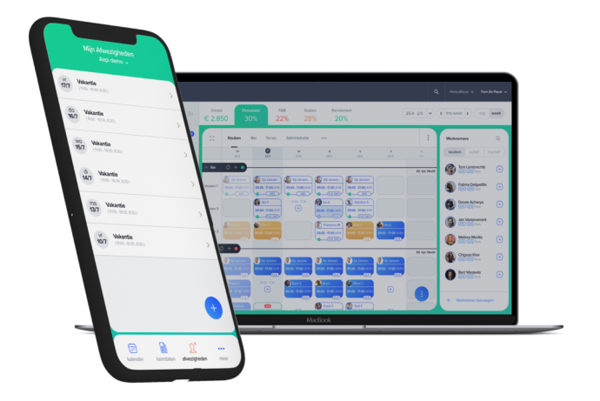
Simplify payroll processing with AAPI PLAY. Approve working hours, process overtime and export payroll data directly to your social secretariat.
FAQ - Payroll Management Software Belgium | AAPI PLAY
How to simplify payroll processing with AAPI
Payroll becomes complicated when employee data, contracts, schedules and working hours are stored in different systems.
AAPI connects those steps.
With AAPI PLAY, managers can review employee performance, approve the correct working hours and prepare payroll information for their social secretariat.
The workflow becomes:
Staffing → Contracting → Planning → Time Tracking → Payroll
Instead of rebuilding payroll information at the end of every month, AAPI uses information already created during the employee’s working process.
What is AAPI PLAY?
AAPI PLAY is AAPI’s payroll-processing environment.
It brings together the information required to prepare employee performance for payroll, including:
- employee information
- contracts
- planned hours
- Dimona information
- registered working time
- overtime and other hour types
Managers review the outstanding performances before sending the processed information to their social secretariat.
How does payroll processing work with AAPI?
A typical payroll process is straightforward:
- Open AAPI PLAY.
- Check employees with outstanding performances.
- Review the hours worked for each employee.
- Select the correct source for the hours.
- Approve the employee’s performances.
- Export the completed payroll information.
- Send it to your social secretariat.
Because the information comes from the wider AAPI workflow, less manual re-entry is required at the end of the month.
Which working hours can be used for payroll?
AAPI PLAY allows managers to determine which hours should be processed.
Depending on the situation, the hours can be based on:
Contract / Dimona hours
The hours defined through the employee’s contractual and administrative setup.
Time registration
The actual working hours recorded through AAPI TIME.
Manual adjustment
Hours manually corrected when required.
This allows managers to resolve differences before the payroll information is finalised.
Which working hours can be used for payroll?
AAPI PLAY allows managers to determine which hours should be processed.
Depending on the situation, the hours can be based on:
Contract / Dimona hours
The hours defined through the employee’s contractual and administrative setup.
Time registration
The actual working hours recorded through AAPI TIME.
Manual adjustment
Hours manually corrected when required.
This allows managers to resolve differences before the payroll information is finalised.
How does Time Tracking connect with Payroll?
AAPI TIME records when employees actually start and finish work.
Those registrations can then be compared with planning and contractual hours.
Once the correct hours have been checked and approved, they can become the basis for payroll processing.
That creates a direct connection:
planned hours → actual hours → approved hours → payroll
This reduces the need to manually transfer working hours from separate timesheets.
How does AAPI handle overtime?
AAPI can interpret different types of working hours, including overtime.
Because planned, contractual and registered hours are connected, managers can review deviations before approving employee performances.
This helps ensure the correct working hours are processed before information is sent to payroll.
How does AAPI connect with a social secretariat?
AAPI connects with social secretariats and payroll partners.
Once employee performances have been reviewed, the payroll information can be exported in the appropriate format for the relevant social secretariat.
AAPI describes this process as preparing timesheets in advance and converting them into the correct format.
The objective is to avoid unnecessary double encoding of payroll information.
Does AAPI replace the social secretariat?
AAPI’s documented workflow focuses on preparing and processing workforce information before sending it to the social secretariat.
The social secretariat remains part of the payroll process.
AAPI connects the operational side — employee information, contracts, planning and worked hours — with the payroll information required by that external payroll partner.
Why connect Planning, Time Tracking and Payroll?
Payroll is the result of everything that happened earlier.
The employee was contracted.
The employee was scheduled.
The employee worked.
The hours were registered.
Those hours were approved.
AAPI connects those steps so payroll does not need to start from scratch every month.
Contract → Planning → Time Registration → Approval → Payroll
Can employees access their payslips?
AAPI ME brings several types of employee information together in the employee app, including schedules, contracts and payslips.
This gives employees digital access to relevant HR information through the same AAPI environment.
Why use AAPI for payroll preparation?
Traditional payroll preparation can require managers to combine information from schedules, time clocks, spreadsheets and employee files.
AAPI creates one connected data flow.
Instead of:
collect → copy → calculate → check → re-enter → send
the process becomes:
record → verify → approve → export
That reduces repetitive payroll administration.
What is AAPI PLAY?
AAPI PLAY is AAPI’s payroll-processing environment for reviewing employee performance, approving working hours and preparing information for the social secretariat.
Can AAPI use time registrations for payroll?
Yes. Managers can process hours according to AAPI TIME registrations.
Can payroll use contract or Dimona hours?
Yes. Contract and Dimona hours can also be selected when processing employee performances.
Can working hours be corrected manually?
Yes. AAPI PLAY provides an option to manually adjust hours when necessary.
Does AAPI connect with social secretariats?
Yes. AAPI supports integrations with social secretariats and prepares payroll information for export to the appropriate partner.
Does AAPI handle overtime?
AAPI can interpret different types of working hours, including overtime, as part of its payroll-processing workflow.
From worked hours to payroll
Payroll should be the final step of your workforce process — not a new administrative project every month.
With AAPI, employee information, contracts, planning and time registrations come together in AAPI PLAY.
Review the hours. Approve the performances. Export the payroll data. Send it to your social secretariat.
One connected workflow from employee to payroll.