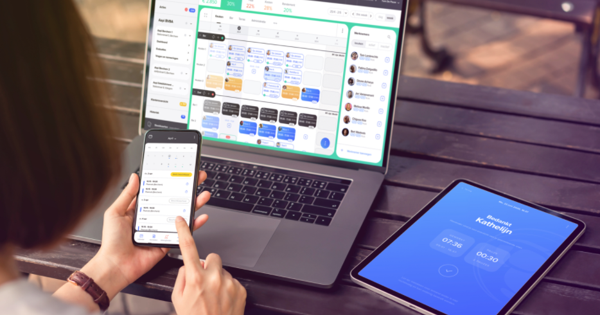
Learn how to manage your workforce with AAPI. Add employees, collect staff data, create contracts, manage availability and connect staffing with planning and payroll.
FAQ - Staffing
How to manage your staff with AAPI
Managing employees involves much more than putting names on a schedule.

Before someone can work, you need the right employee information, employment status, contract, function and administrative data. Employees also need access to their schedules, documents and communication.
AAPI brings these elements together in one digital staff management environment.
With AAPI, businesses can add employees, collect their personal information, manage contracts, organise employee data and give team members access to the information they need through AAPI ME.
The result is one connected workforce instead of employee information spread across spreadsheets, documents, emails and separate systems.
What is staff management with AAPI?
Staff management with AAPI means digitally managing the employees who form your workforce and connecting their information with the processes they need to work.
AAPI combines staff information with other workforce processes including:
- employee onboarding
- personal employee data
- employment status and functions
- contracts
- digital signatures
- Dimona
- employee availability
- schedules
- absences
- communication
- time registration
- payroll
This means employee information does not remain isolated in an HR file.
Once an employee is registered in AAPI, that information can become part of the wider workflow from staffing to planning, tracking and payroll.
How do you add a new employee in AAPI?
Adding a new employee should not mean manually copying the same information between different documents and systems.
With AAPI, you can invite a new employee digitally.
A typical onboarding process looks like this:
- Add or invite the employee. A new employee can be invited to provide their information digitally.
- Collect the required personal data. Employees can enter their personal information through AAPI ME.
- Choose the appropriate employment information. The employee can be linked to the relevant function and employment status.
- Create the contract. Once the employee information is complete, the employment contract can be prepared.
- Send the contract digitally. The employee receives the document through AAPI ME.
- Sign and store the contract. Contracts can be signed digitally and stored centrally.
- Make the employee available for planning. Once the required employment information is in place, the employee becomes part of your operational workforce.
Instead of managing onboarding as a separate administrative process, AAPI connects it directly with day-to-day staff management.
How can employees enter their own personal information?
AAPI allows new employees to provide their own information digitally.
Employees can be invited to use the AAPI ME application, where they enter their personal details.
Once their information has been completed, the employer can continue with the relevant administrative processes.
This reduces the need to manually transfer employee information from paper forms, emails or messages into another system.
It also creates a central employee record that can be used throughout AAPI.
Can employee information be added using an identity card?
AAPI also supports digital collection of personal information using an identity card and eID reader.
This offers another way to capture employee information directly instead of entering all details manually.
Once the required personal information is available, it can be used to continue the employee’s administrative setup.
The objective is simple: capture employee information once and use it throughout the workforce-management process.
How do you create an employment contract for a new employee?
Once the employee’s information is complete, the next step is creating the appropriate contract.
Within AAPI, employee information and contract management are connected.
The employer can select the appropriate employment information, function and contract details and prepare the contract digitally.
Once created, the contract can be offered to the employee for signature through AAPI ME.
This connects an important part of employee onboarding directly with the digital employee record instead of treating contract creation as an entirely separate process.
Can employees sign contracts digitally?
Yes.
Employees can receive and sign contracts digitally through AAPI ME.
The employer uploads their signature once, after which AAPI can use it within the contract workflow. The employee signs the relevant documents through the app.
Signed documents can then be stored digitally.
This removes much of the traditional process of printing a contract, signing it manually, scanning it and storing or sending separate copies.
How does AAPI manage different types of employees?
Not every workforce consists of one type of employee.
AAPI is designed for organisations managing different employment arrangements, including permanent staff, students and flexi workers.
Employee status matters because it can influence contracts, Dimona, scheduling and payroll processes.
AAPI therefore connects the employee record to the information required further along the workflow rather than treating every member of staff identically.
That is particularly important for businesses operating with a dynamic workforce.
How does staffing connect with Dimona?
Employee onboarding and Dimona are connected within AAPI.
Once the required employee information and employment status are available, AAPI can use that information within the relevant Dimona process.
This avoids creating a separate disconnected administrative flow between adding an employee and preparing them to work.
It also means changes further along the workflow — such as relevant schedules or absences — can be connected with Dimona processing.
For employers, the employee record becomes the starting point for several connected administrative processes.
Can AAPI manage employees with a foreign nationality?
Yes.
AAPI contains functionality for employees who do not have Belgian nationality.
Employees can provide the required information through the digital onboarding process, after which AAPI can support the relevant Dimona process.
This makes it possible to manage these employees within the same workforce environment instead of maintaining a separate staffing administration.
How can employees manage their information through AAPI ME?
AAPI ME is the employee-facing part of the AAPI environment.
It gives employees direct access to important information connected with their employment.
Depending on the functionality being used, employees can access items including:
- schedules
- availability
- shift changes
- contracts
- documents
- payslips
- absence information
- communication
This creates an employee hub where team members can consult information themselves rather than having to request it repeatedly from a manager.
How do you manage employee availability?
Knowing who works for your company is one thing.
Knowing who is actually available to work is another.
AAPI connects employee availability with the wider workforce-management environment. Employees can provide availability information, which can then be used when planning shifts.
This is particularly useful for organisations working with flexible workforces where availability changes regularly.
By keeping employee information and availability connected, managers have a clearer view of the workforce they can actually deploy.
How do you manage absences?
Absences are part of staff management too.
Employees can communicate absence or leave information digitally, while managers can manage the impact on their workforce through AAPI.
When an employee becomes unavailable, AAPI can help identify colleagues with the same function who may be able to take over the work.
This connects absence management with both staffing and planning.
Instead of seeing only that someone is absent, you can immediately move towards solving the staffing gap that absence creates.
How do you communicate with employees?
Keeping employee communication separate from workforce administration quickly creates fragmentation.
Schedules are in one system. Contracts are somewhere else. Questions arrive through WhatsApp. Availability comes by text message. Documents arrive by email.
AAPI is designed to centralise more of that employee interaction.
AAPI ME gives employees access to their workforce information, while WHATSAAPI supports internal communication and notifications.
This helps keep operational communication closer to the information and processes it relates to.
Can different managers have different access rights?
Yes.
AAPI allows different user rights to be assigned.
This means organisations can determine which functions or information particular users can access.
For example, access can differ depending on location, department or responsibility.
A manager may need access to employees within a particular branch, while HR may require broader access to employee information and contracts.
This is particularly useful for organisations with multiple locations or different management responsibilities.
How does staffing connect with planning?
Staffing answers the question:
Who is part of my workforce?
Planning answers:
When should those people work?
The two processes are closely connected.
Once employees have been added, their employment information is complete and the appropriate contracts are in place, they can become part of the planning process.
Managers can then use information including employee function and availability when scheduling work.
This creates a natural flow:
employee → contract → availability → planning
Instead of rebuilding employee information inside a separate scheduling tool, AAPI connects the workforce with the schedule.
How does staffing connect with time tracking?
Once an employee has been onboarded and scheduled, the next operational question is whether the planned hours were actually worked.
AAPI connects workforce information with AAPI TIME, its digital time clock solution.
Employees can clock in and out, allowing registered working hours to become part of the wider employee-management process.
This extends the workflow:
employee → contract → planning → time registration
The employee record therefore remains relevant throughout the complete working process.
How does staffing connect with payroll?
The employee information collected at the beginning of the process is also important at the end.
AAPI connects workforce administration with payroll processes and social secretariats.
Employee information, contracts, planning and registered hours can therefore form part of one connected flow towards payroll.
The complete process becomes:
staffing → contracting → planning → tracking → payroll
This reduces the need to manage the same employee through several disconnected administrative systems.
Can I manage staff from my smartphone?
Yes.
AAPI provides both a web environment and mobile applications.
Managers can use the AAPI employer app for important day-to-day workforce actions, including adding and managing employees, preparing contracts, communicating and managing operational changes.
Employees use AAPI ME to access their own information and interact with relevant workforce processes.
This means staff management is not limited to a desktop environment.
Can AAPI manage staff across different locations?
AAPI supports workforce management across different branches or locations.
User access can also be organised according to responsibilities, allowing organisations to give relevant managers access to the employees and information they need.
This makes the platform useful for companies where staff management is distributed across several locations but still needs to remain centrally organised.
Why use AAPI instead of spreadsheets for staff management?
A spreadsheet can hold a list of employees.
But a list of names is not workforce management.
AAPI connects employees with the processes surrounding their employment:
personal data → contracts → availability → planning → communication → time tracking → payroll
When these processes are managed separately, employee information needs to be copied, checked and updated in multiple places.
With AAPI, the employee becomes part of one connected digital workflow
What is the difference between Staffing and Planning in AAPI?
Staffing covers the workforce itself: employee information, onboarding, contracts, functions, availability and access to employee services.
Planning takes that workforce and organises when people work.
The two are connected, but they solve different parts of workforce management.
AAPI brings both together so information created during staffing can be used when scheduling employees.
Who is AAPI Staffing designed for?
AAPI is designed for organisations that need to manage employees efficiently while connecting workforce administration with day-to-day operations.
The platform is used across sectors including hospitality, restaurants, cafés and bars, hotels, events and catering, services and other businesses managing dynamic workforces.
It is particularly relevant for organisations managing combinations of permanent and flexible employees or operating across several locations.
What are the main advantages of managing staff with AAPI?
AAPI creates one connected environment around the employee.
Instead of managing employee data, contracts, availability, schedules, time registration and payroll as isolated processes, these elements can become part of one workflow.
The central principle is straightforward:
Add your employee once. Use that employee information throughout the entire workforce-management process.
That means less fragmented administration for managers and easier access to relevant information for employees.
What is staff management software?
Staff management software helps organisations manage the people in their workforce and the information and processes connected with them. AAPI connects employee management with onboarding, contracts, availability, planning, time registration and payroll.
Can I add new employees digitally with AAPI?
Yes. New employees can be added to AAPI and invited to provide their personal information digitally through AAPI ME.
Can I create employment contracts in AAPI?
Yes. Once the required employee information is available, contracts can be prepared through AAPI and offered digitally to the employee.
Does AAPI support permanent and flexible staff?
Yes. AAPI is designed to manage different employee types and is used for workforces containing permanent employees, students, flexi workers and other employment arrangements supported by the platform.
Does AAPI connect staffing with payroll?
Yes. AAPI connects employee management with contracts, planning, time registration and payroll workflows and integrates with social secretariats.
Does AAPI have an employee app?
Yes. AAPI ME gives employees mobile access to information including schedules, availability, shift changes, contracts and payslips.
One employee. One connected workflow.
Managing staff should not mean entering the same employee information in system after system.
With AAPI, the employee becomes the starting point of a connected workforce workflow.
Add your people. Collect their information. Manage their contracts. Understand their availability. Plan their work. Track their hours. Connect the result with payroll.
Manage your workforce from one digital environment with AAPI.